Can't verify — will still try to print
This is not a fault. Your printer does not answer status questions, which a great many inexpensive thermal printers do not while printing perfectly well. Rather than show a green dot it cannot justify, the register says what it does not know — and keeps sending every ticket exactly as before. There is nothing to do unless paper stops coming out.
Whatever the printer does, the sale is already saved — the register writes the bill to its own database first and queues the paper second. The full nine-symptom checklist covers the rest.
The printer takes the job and never says a word about itself.
- The printer answers no status query. The register asks for the standard ESC/POS status and accepts only a structurally valid reply. Many budget clones reply with nothing, or with something that is not a status byte at all, and both mean the same thing: unknown.
- It is a Windows driver queue. A printer added as a Windows printer prints through the spooler, which passes bytes on and reports nothing back. Those rows always read this way, and the form labels them “Windows printer (driver queue — no live status)” so it is not a surprise.
Do this first.
Run a test print and look at the paper
The printer's row in Settings → Printers & KDS has a Test print key. A slip that comes out with the width ruler on it proves everything that matters: the register can reach the printer and the printer can print. That slip is your green light.
Carry on — nothing else needs doing
Jobs are queued and sent exactly as they are for a printer that does answer. The retries, the reroutes and the reprints all behave identically. The only difference is that the register will not claim to know the paper state.
If tickets stop coming out, look at the printer
Paper, cover, power, in that order — the three things the register cannot see on this printer. Then check the queue: if jobs are stacking up there, the register is being refused or ignored, which is a different problem with its own page.
What the printer's row says.
Every printer you have added has a row in Settings → Printers & KDS, and the row carries its own status in words rather than a green dot. These are the exact words for this one.
- While it is wrong: “Can't verify — will still try to print”, in neutral grey rather than a warning colour, because nothing is wrong. It is the resting state for this class of printer and stays there all day.
- Once it is fixed: It does not change, and it does not need to. The state clears only if the printer starts answering, which most never will.
The register treats a probe as having three outcomes, not two: known-good, known-bad, and unknown. A reachable printer that answers nothing is never rounded up to Connected — a false green on a printer that has quietly run out of paper is worse than an honest grey.
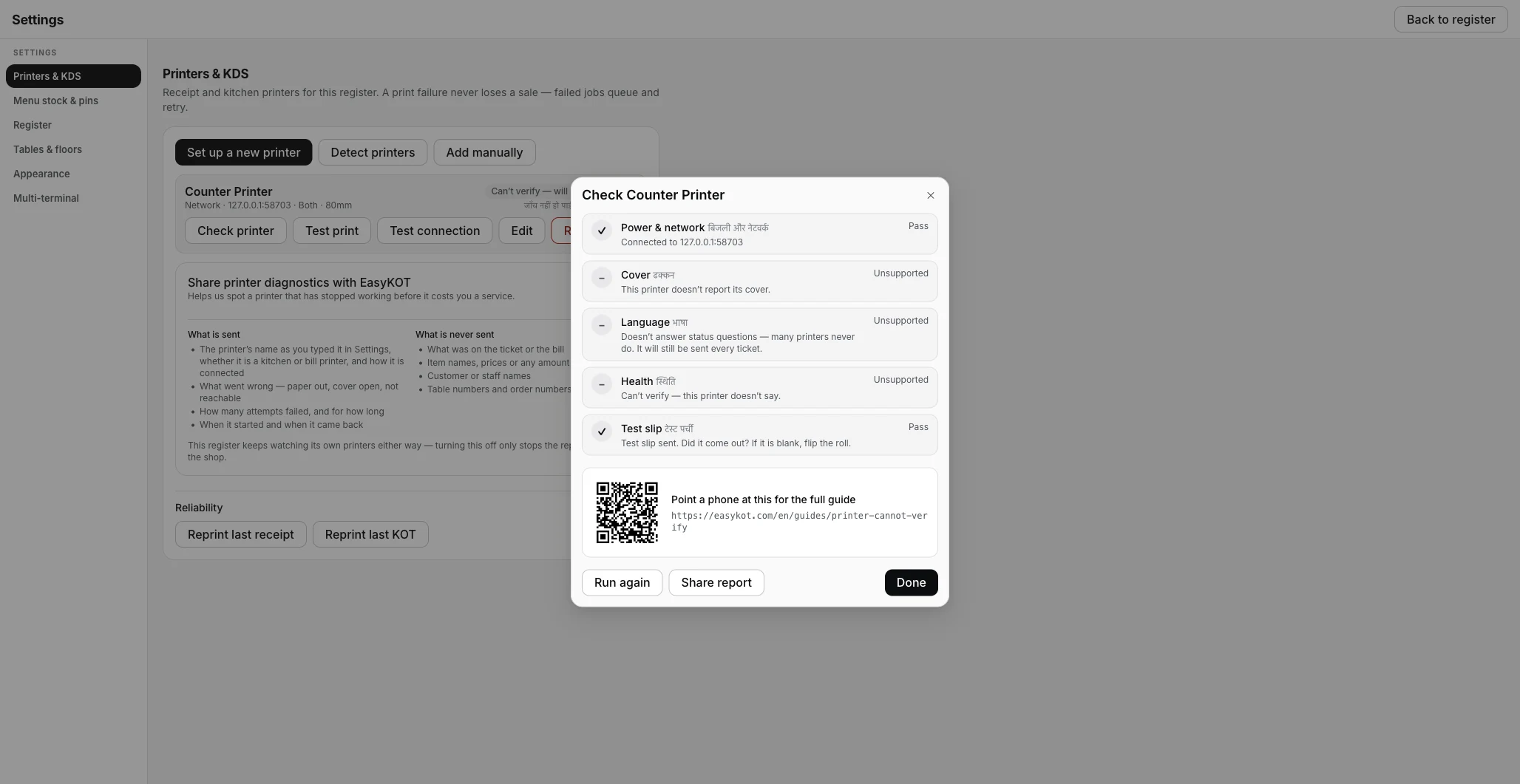
Three of the five checks come back Unsupported rather than failing — the register says plainly what it cannot know, and still sends every ticket.
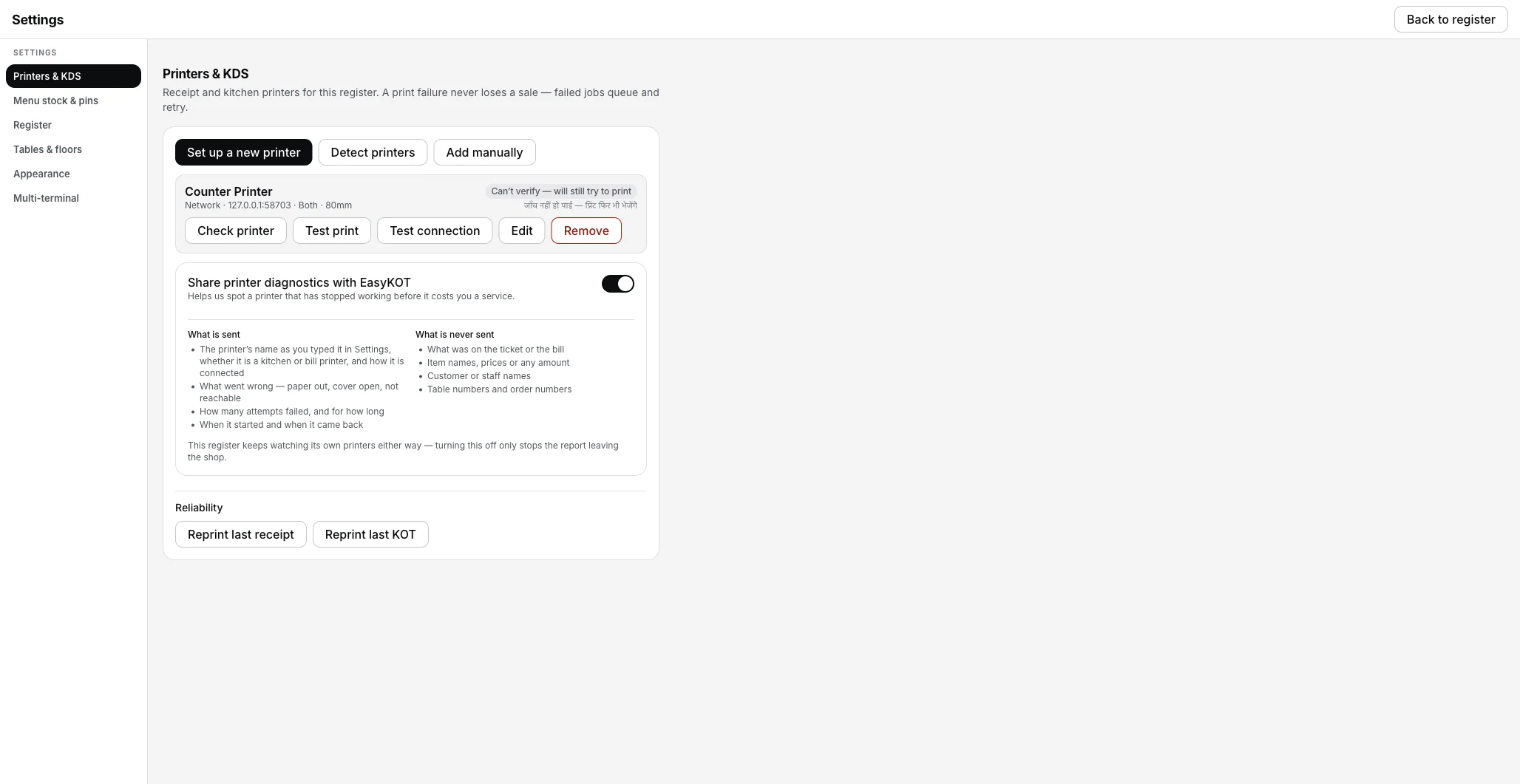
The resting state for this class of printer, in neutral grey rather than a warning colour — it stays this way all day and is not an error.
Printing what was missed.
- Everything still queues and retries. Failures, backoff and reroutes work exactly as they do on a printer that answers. This state affects what the screen claims, not what the register does.
- The paper is the only real check. On a kitchen printer that means walking to the pass. That is true of every POS with this class of printer — the difference is that this one says so.
- Reprints work normally. Reprint last receipt and Reprint last KOT are in Settings → Printers & KDS; a settled bill comes back from Orders stamped DUPLICATE.
Can't verify — the questions that follow.
Can I make it say Connected instead?
Is my printer broken or unsupported?
Which printers do report their status?
If that was not it.
Prints once, then stops
When paper does stop coming out — a sleeping radio, a full buffer, or a quiet paper-out.
Fix the stall →Paper out
What a printer that does report its sensor shows, and how the queue pauses for it.
See a reported fault →Connect a thermal printer
Every field on the printer form, the test print, and the paper width ruler.
Set the printer up →Every printer guide is listed on the guides hub.
Run it 3 months, then pay for it.
Three months free, full product, no card. Made in India, for the counter — built inside a running restaurant.