Kitchen screen lagao — KOT ab paper pe nahi, screen pe.
A kitchen display is a spare screen with three habits: it shows every fired KOT the moment the floor fires it, it lets each station see only what that station cooks, and it counts the same dish across tables so the tandoor makes nine naans as one batch. Any old laptop or tablet you already own can be that screen — here is the whole setup.
Want to see the board first? The KDS feature page walks every screen with real captures.
Purana tablet se chalti hui kitchen tak — chaar steps.
Pair the kitchen device to your till
On the main register, open Settings → Multi-terminal and mint a code for a till — it lives for five minutes. On the kitchen device (an old laptop, a spare tablet with a keyboard, anything that runs the app), choose 'Join a hub' and enter the code. The two now share the floor, the orders and the kitchen board over your shop's own network — internet or not.
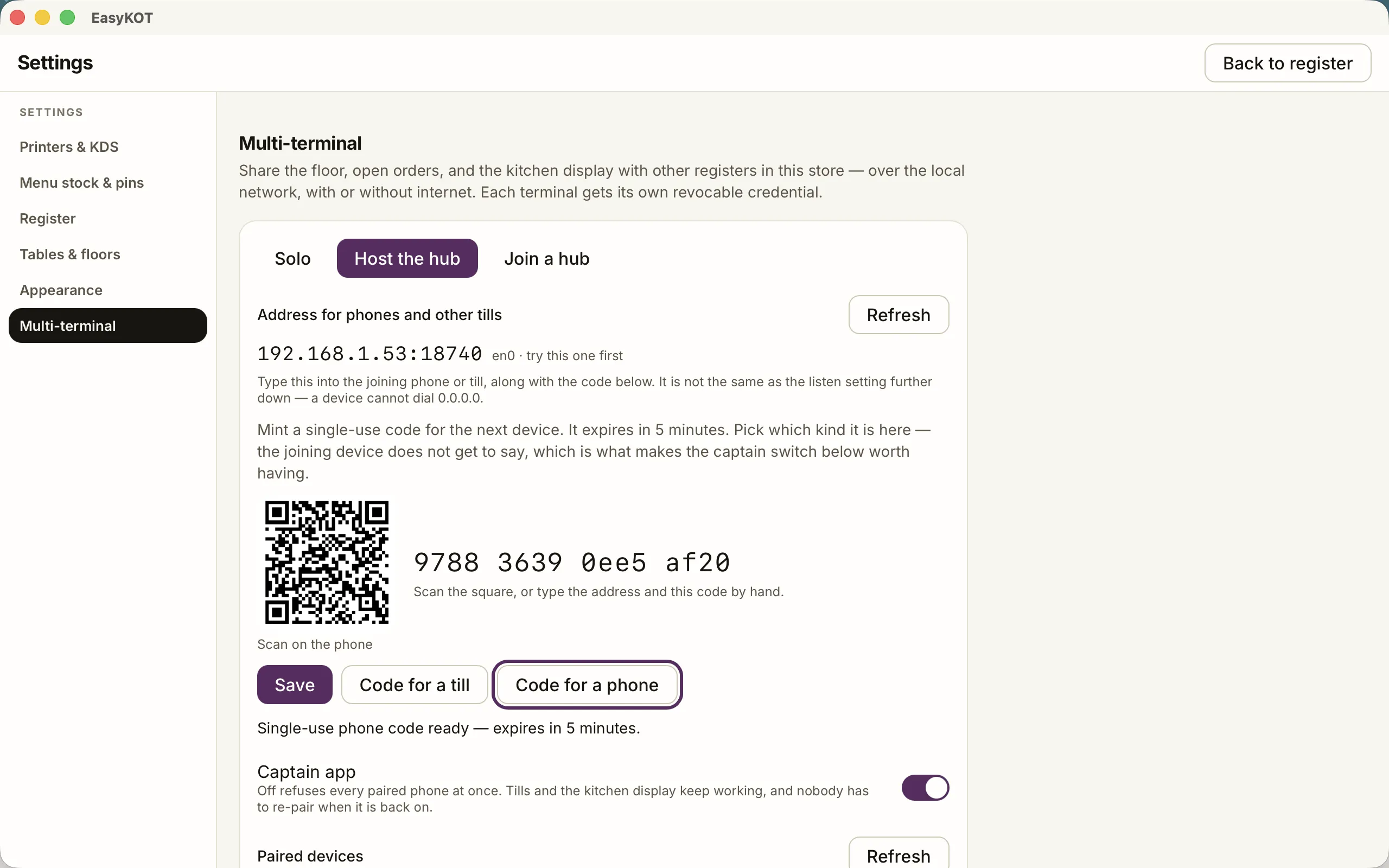
Step 1 — the till mints a five-minute code; the kitchen device joins with it.
Sign it in with the chef's PIN
This is the whole trick: sign the kitchen device in with a staff PIN whose role is Chef. A chef PIN locks that screen to the kitchen board — it cannot wander into the register, the money or the settings, and every route leads back to the pass. The till stays the till; the kitchen screen can only ever be the kitchen screen.
Tell the screen what this station cooks
Under the board's header sits a 'Cooks' row — one checkbox per menu category. The tandoor screen ticks Tandoor and Roti & Naan; the wok screen ticks Chinese. A ticket then shows each screen only its own lines, with '+2 items at other stations' so nobody serves half a table. Leave everything unticked and the screen simply shows the whole kitchen.
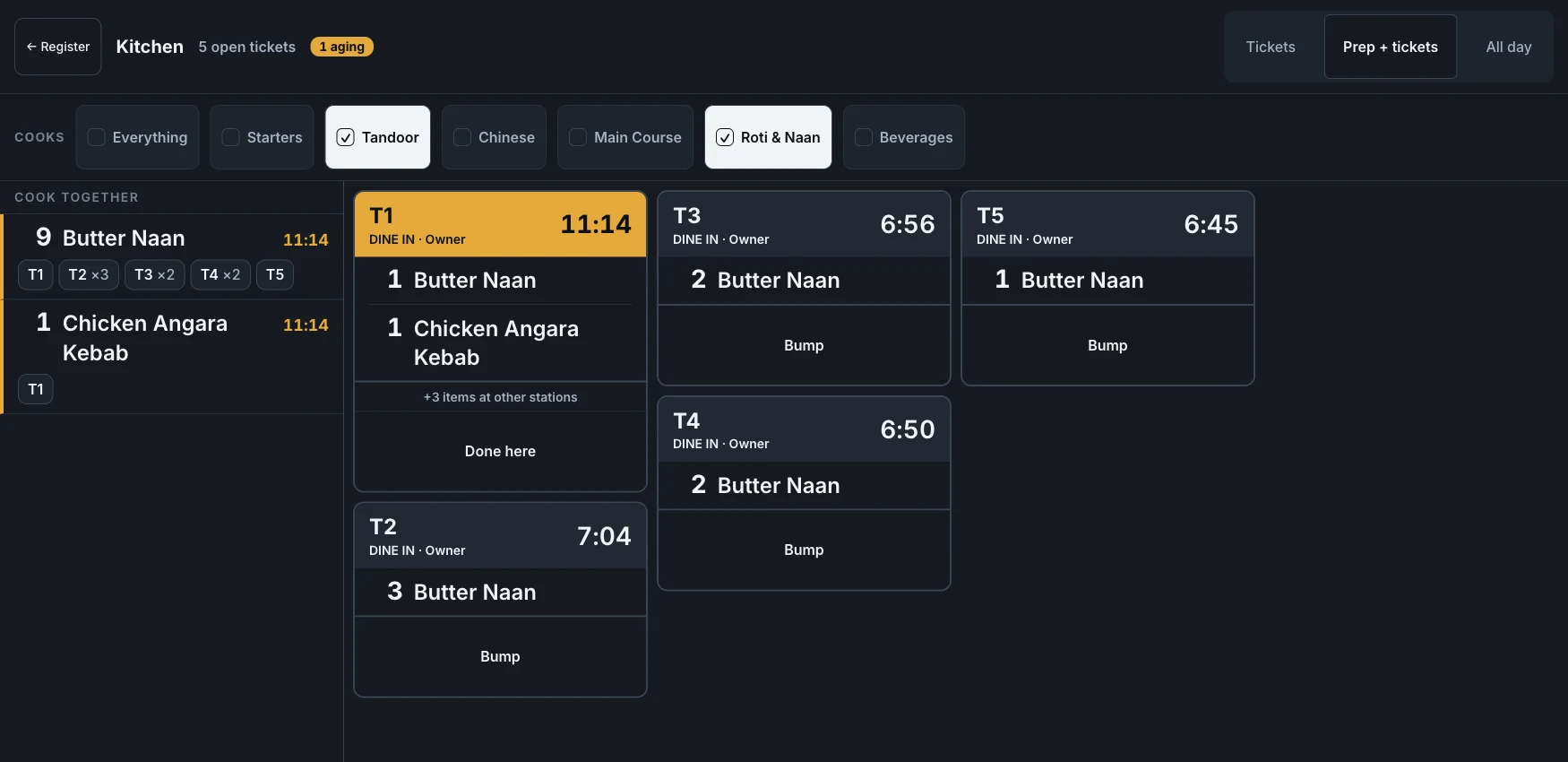
Step 3 — this screen cooks Tandoor and Roti & Naan; the rest of the table shows as a count, not clutter.
Cook off the prep lane, bump when it leaves the pass
Flip the header toggle to 'Prep + tickets' and the same board regroups by dish: '9 Butter Naan' with a chip per table, so the tandoor cooks one batch instead of reading five tickets. Notes never fold into a batch — 'less spicy' stays its own line. When a ticket's food goes out, the chef hits Bump (or 'Done here' on a station screen) and it leaves the board.
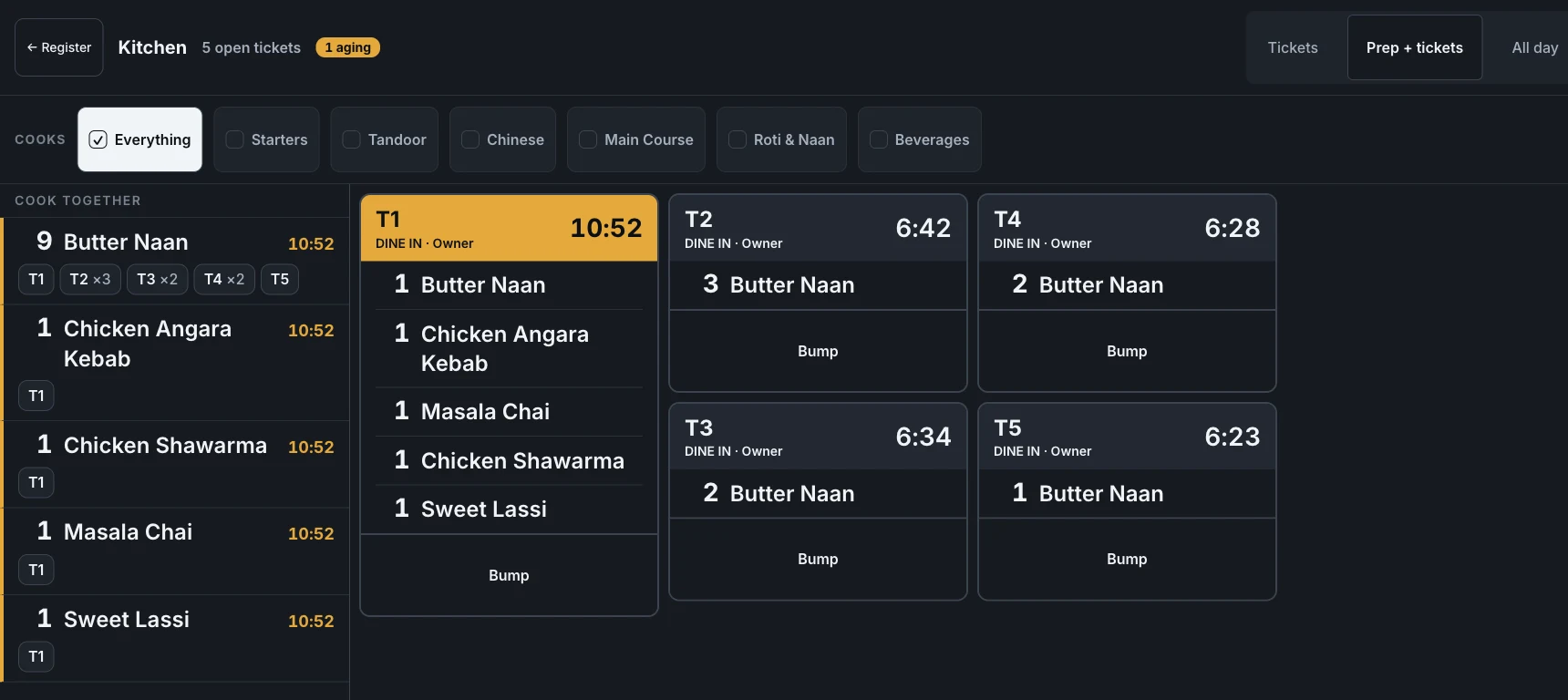
Step 4 — the same board regrouped by dish: one batch of nine naans, not five tickets to cross-read.
The chef PIN needs to exist first. Staff and their PINs are created in the owner dashboard at easykot.com, not on the till — add a person with the Chef role there, let it sync, then sign the kitchen screen in. The staff & PINs guide is the five-minute version.
Who clears a ticket — the settle, or the chef?
Kitchens fall into two camps, and one toggle serves both. It lives in Settings → Register: "Clear kitchen tickets on settle".
- Dine-in default — leave it on. Food goes out, the table pays, the check settles, and its ticket leaves the board by itself. Chefs forget to bump; a pass that silts up with cooked-and-paid tickets stops being read at all.
- Pay-first counter — turn it off. If guests pay before the food is cooked, a settle must not clear the board — the ticket now waits for a real Bump, and paid food cannot vanish off the pass uncooked.
- It is per register, and it is yours — not a support call. Flip it in Settings the day your service style changes.

Straight answers.
What hardware do I need for the kitchen screen?
Does the kitchen screen need internet?
Can one kitchen run several screens with different jobs?
What happens to a ticket when the cashier settles the bill?
What if a rush grows past the edge of the screen?
Is this the same thing as the kitchen KOT printer?
KDS ke liye alag se paisa lagta hai kya?
Round out the kitchen.
Kitchen KOT printer
Paper at the pass, bills at the counter — the printer routing that pairs with (or precedes) the screen.
Set up the KOT printer →Staff PINs & roles
The chef PIN that locks the kitchen screen — and what every other role can and cannot do.
Set up staff →The KDS, screen by screen
Aging colours, the all-day view, station boards — the feature tour with real captures.
See the KDS →Every guide in this cluster is listed on the guides hub.
3 mahine chalao, phir paisa lagao.
Three months free, full product, no card. Made in India, for the counter — built inside a running restaurant.