Kitchen stations — ek order, teen corner, teen ticket.
A tandoor, a wok line and a bar do not want one shared ticket — each corner wants only the lines it actually cooks. Set the split once in the dashboard: name a station, tick the categories it covers, and choose who covers for it if its printer goes down. On each register, point a printer at that station. From then on, one fired round becomes one ticket per corner that has a printer bound to it — and anything nobody claimed still prints, on the whole-kitchen printer, so a category you haven't sorted yet is never late.
Store-wide station list · per-till printer binding · unclaimed lines always print somewhere
Store mein set karo, register pe printer jodo — paanch steps.
Before stations exist on a store, every fired round is one KOT on one kitchen printer — a starter, a main and a drink all on the same slip, whichever corner happens to be closest to the printer. That works for a small pass. It stops working the moment a tandoor, a wok line and a bar each want to see only their own lines: nobody at the bar wants to scan a full-page ticket for the one mocktail buried in it, and a cook who has to read past six other dishes to find the two that are theirs is exactly where a busy Saturday starts losing tickets on the floor. A station doesn't change how an order is rung up or fired on the register — the cashier's screen looks the same either way — it only changes which printer each line reaches once that fire happens.
Open Settings → Kitchen stations in the dashboard, and add a station
Sign in to the owner dashboard and open Settings. Kitchen stations is its own card, with the same explanation it shows on screen: "Split a table's order across the corners that cook it — the tandoor gets the kebabs, the bar gets the drinks." Press Add a station and name it after the corner it actually covers — Tandoor, Wok, Bar, Grill — up to twelve stations on one store. A brand-new store shows "No stations yet — every order prints as one ticket on the kitchen printer," and nothing changes until you add the first one.
Tick the categories this station cooks
Every station carries a Cooks these categories checklist pulled from your own menu, showing both parent categories and their children as "Parent › Child" — for example Tandoor › Kebabs & Tikka. Tick a child to claim just that one, or tick the parent to claim everything under it in one go: ticking Tandoor claims Tandoor › Tandoori and Tandoor › Kebabs & Tikka without ticking either by hand, and a new child category added later under an already-claimed parent is covered automatically. A category can only belong to one station — the first station that claims it in your own list order owns it, so two stations can't quietly fight over the same dish.
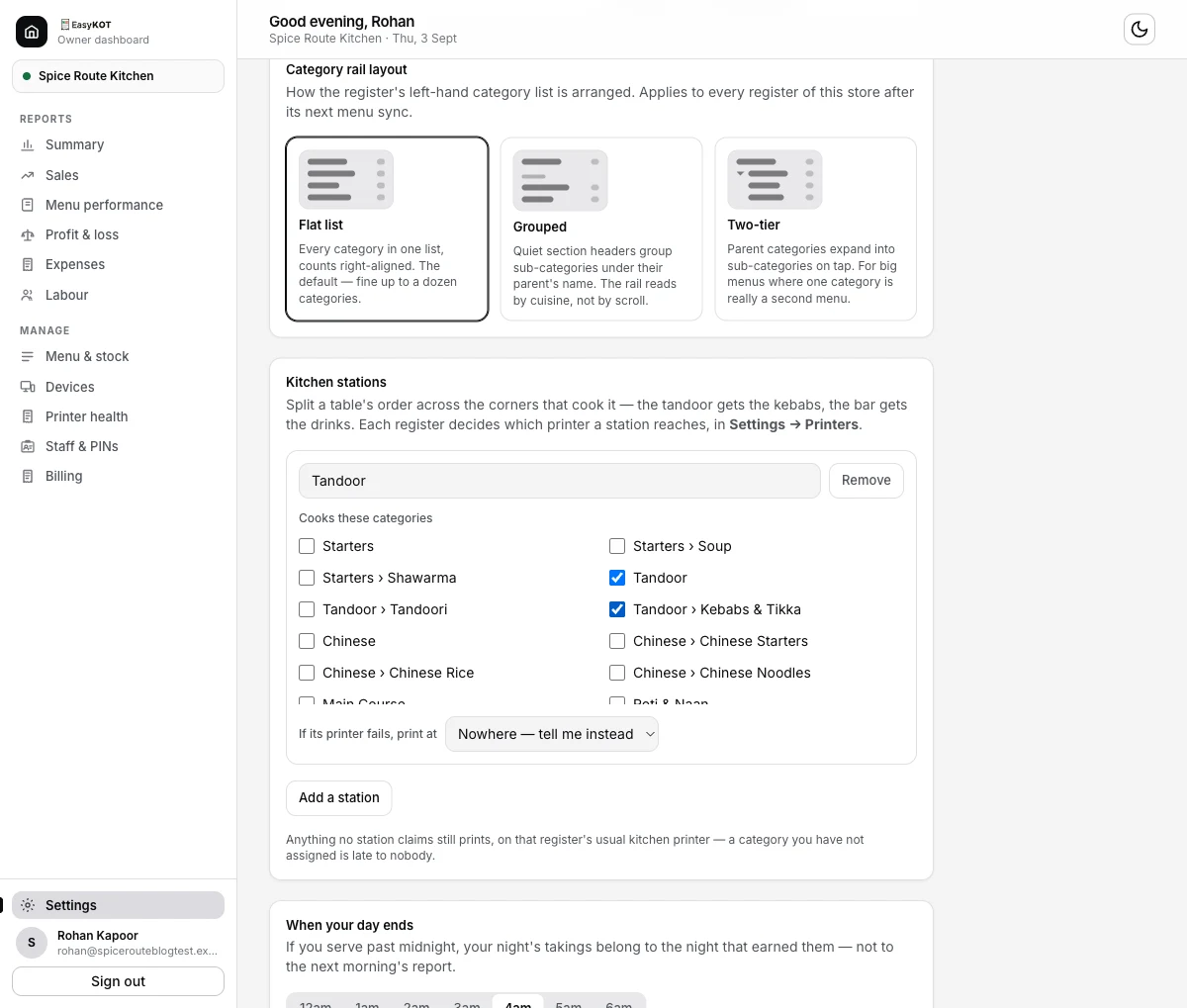
Step 2 — Tandoor, with Tandoor and Tandoor › Kebabs & Tikka ticked. A ticked parent covers every child under it.
Decide what happens if its printer fails
Each station carries its own "If its printer fails, print at" choice: pick another station to cover for it, or leave the default, "Nowhere — tell me instead." This is a real decision worth making at setup rather than mid-service — a tandoor with no backup just waits in the print queue until someone notices, while a tandoor backed by the grill station's printer gets its tickets rerouted there automatically after the retries run out. A station can't be its own backup. Removing a station also clears it from any other station that named it as a backup — there is no unlinking to do first.
On each register, point a printer at the station
Stations themselves are store-wide — every till agrees on the names and the categories, because the list lives on the store, not the device. But which physical printer answers for "Tandoor" is a per-till choice, because the same tandoor socket is different on every machine. On that register, open Settings → Printers & KDS, edit (or add) the kitchen printer that sits nearest that corner, and pick the station from the new Kitchen station dropdown next to Role. Leave it on Whole kitchen (everything) — the default — and that printer keeps taking every kitchen ticket, exactly as it always has.
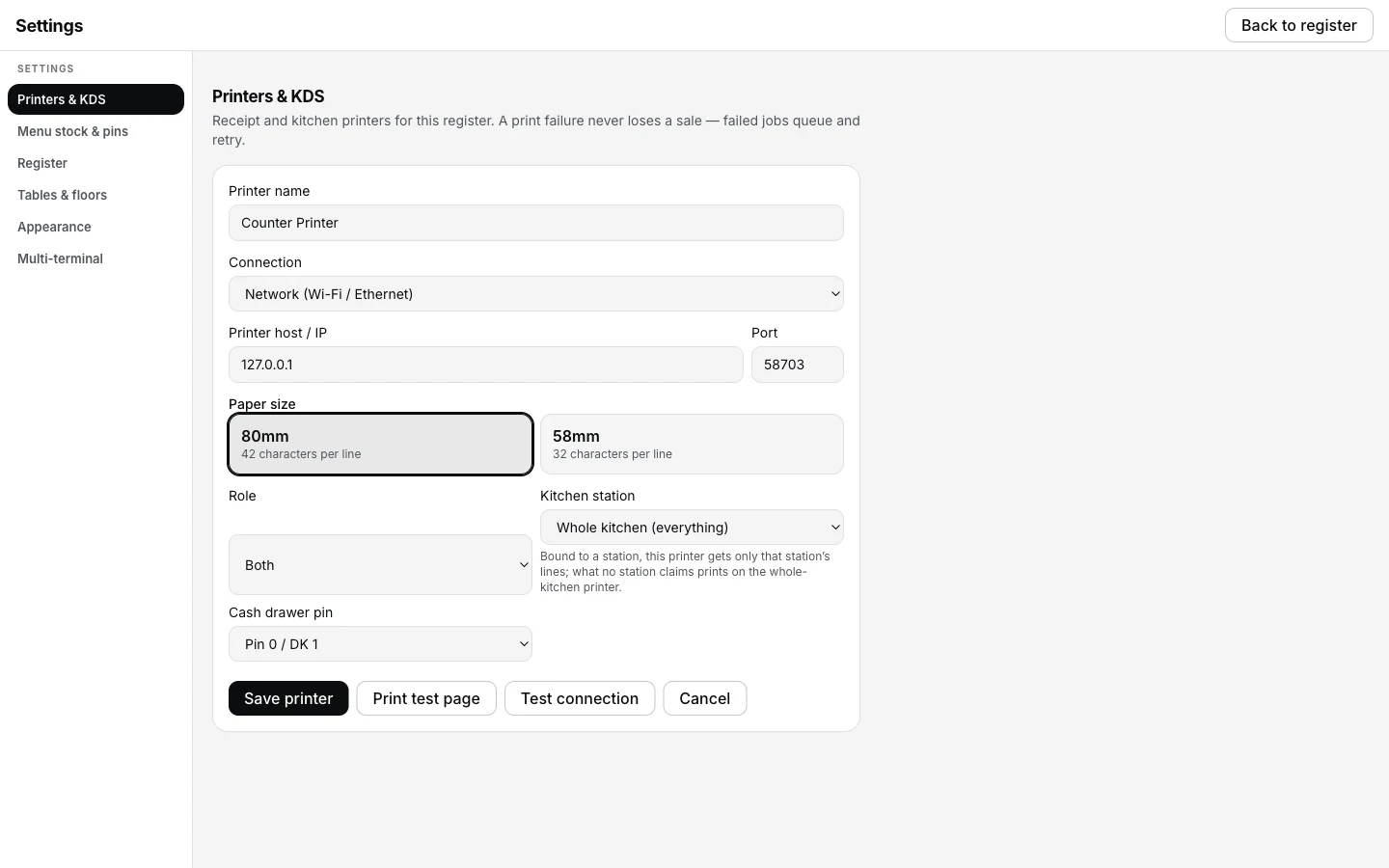
Step 4 — Settings → Printers & KDS → edit a printer → Kitchen station. Left on Whole kitchen (everything), this printer keeps every ticket.
Fire an order and watch the ticket split
Ring up a table with items from two different stations — say a starter from the tandoor and a drink from the bar — and fire the round. If both corners have a printer bound on this till, two tickets come off two rolls at the same moment: the tandoor's ticket carries only the tandoor lines, the bar's only the bar lines. Anything the till can't route — a category no station claims, or a station with no printer bound here — joins a single ticket on the whole-kitchen printer instead, so nothing is ever held back waiting for a corner that isn't wired up yet.
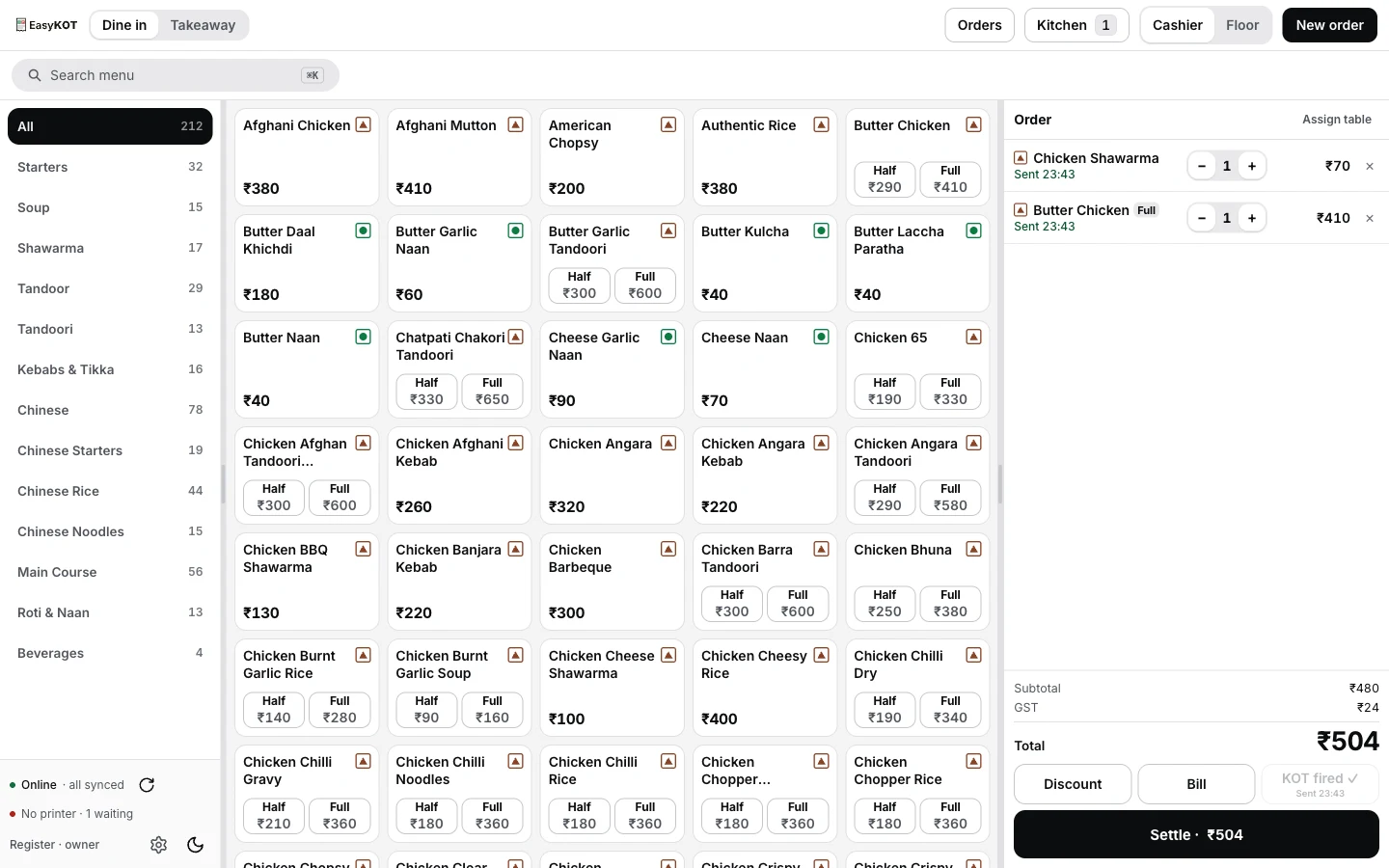
Step 5 — a round just fired. The Kitchen badge ticks up the moment the ticket (or tickets) reach the pass.
The station's name rides the ticket number, not a new one. A two-station round is still one KOT number, because it is one fire. Each printed ticket that number produces carries that same number with the station's name added after it — a cook holding two tickets from two corners can tell at a glance they belong to the same round.
One acknowledgement per fire, not per ticket. The round is marked printed on the shared order ledger exactly once, the moment every station's paper — and the leftover ticket, if there is one — has been queued. That is what lets a second till take over a printer mid-service without the kitchen getting the same round twice.
A station with no backup just waits, visibly. After a station's bound printer exhausts its retries — roughly 1, 2, 5, 15, 30 and 60 seconds apart — a backup you set in step 3 gets that ticket rerouted to it exactly once, marked so the covering corner knows it wasn't originally theirs. With no backup set, or no printer bound to the backup on this till, the ticket dead-letters: it sits in the print queue, re-queueable by hand, never silently dropped.
Straight answers.
Do I need this if I only run one kitchen printer?
What if a station has no printer bound on this particular till?
I forgot to tick a category on any station — where does it go?
Does the tandoor station need setting up separately on every register?
What happens when a station's printer runs out of paper mid-service?
Do-station order mein KOT number bhi do ban jaate hain kya?
Wire the printers this feeds.
Connect a printer
Add the first thermal printer to a register — network, USB or Bluetooth.
Connect a printer →A printer not printing
The five checks, in order — for when a station's ticket doesn't show up.
Troubleshoot printing →Every Settings card
GST, notifications, invoice identity, trading day — the whole dashboard Settings page, in order.
See owner settings →Every guide in this cluster is listed on the guides hub.
3 mahine chalao, phir paisa lagao.
Three months free, full product, no card. Made in India, for the counter — built inside a running restaurant.