Doosra till, teesra till — ek hi store, ek hi floor.
The day one till stops being enough is a good day — the queue got long. Adding the second register is a five-minute pairing, not an IT project: one till hosts a meeting point on your own Wi-Fi, the rest join with a code, and the whole counter works one floor, one order list, one kitchen — internet optional.
Ek till se poore counter tak — teen steps.
Make one till the hub
On your main register: Settings → Multi-terminal → 'Host the hub'. The screen shows the address other devices will find it at on your shop's network. That's the whole job of the hub — a meeting point on your own Wi-Fi; there is no server to install and no cloud dependency for the tills to talk.
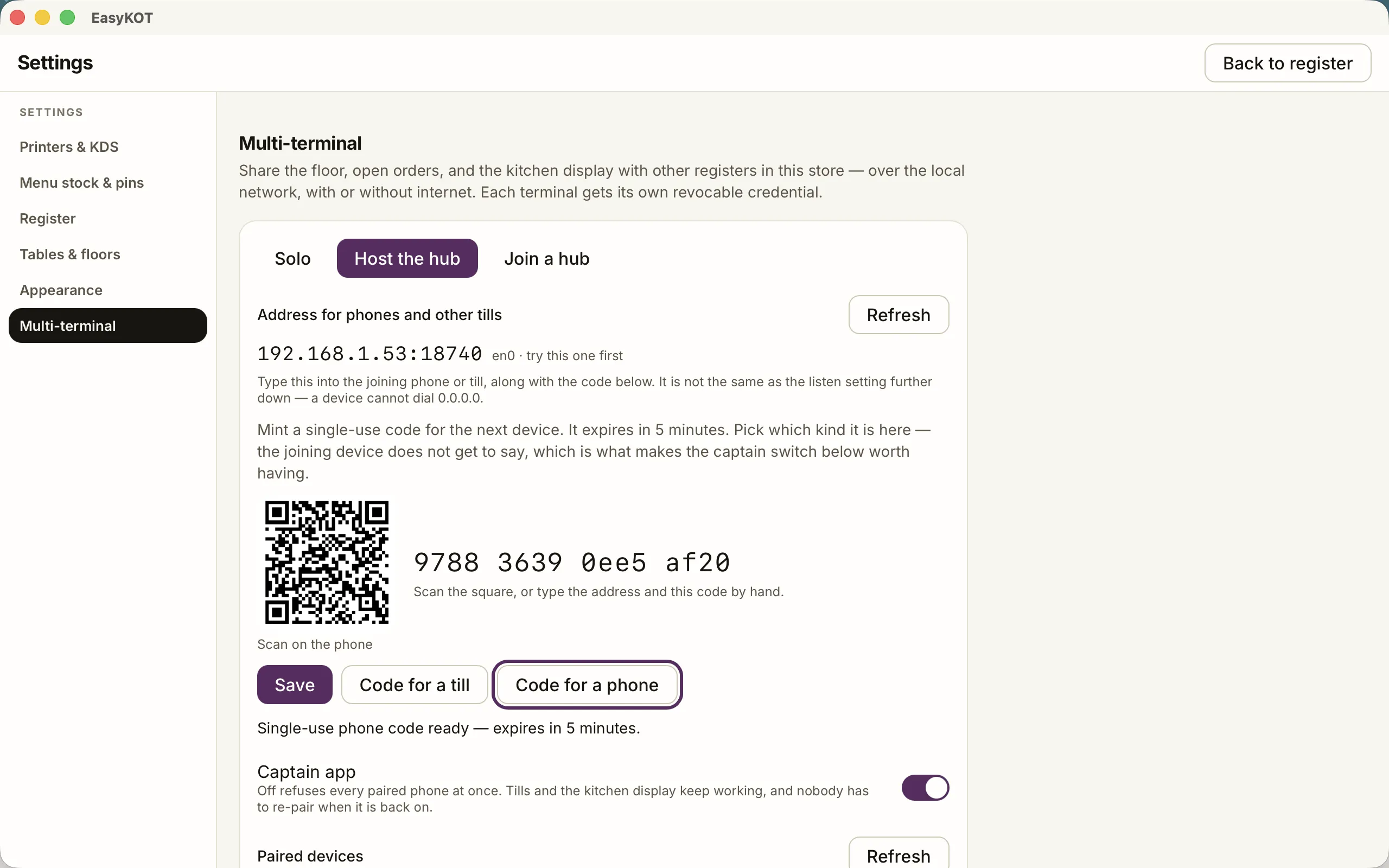
Step 1 — one till hosts; the screen shows exactly the address others dial.
Pair the second till with a five-minute code
Tap 'Code for a till' — a single-use code, alive for five minutes, shown big and as a QR. On the new till: 'Join a hub', let it find the hub by itself (or type the address if your network is strict), enter the code, 'Pair and save'. Done — pairing a waiter's phone is even shorter: mint 'Code for a phone' and the captain app scans the QR in one step.
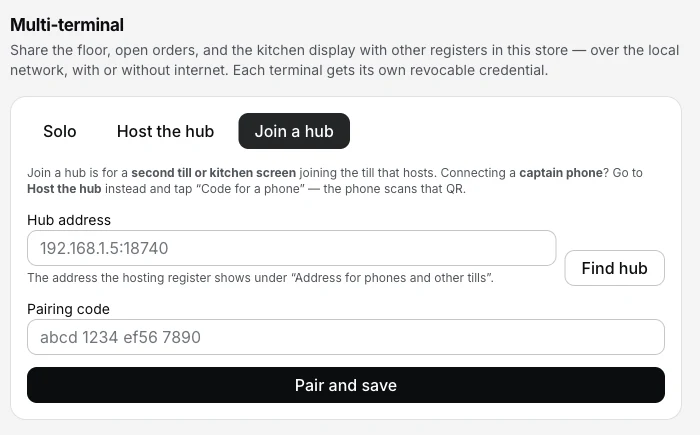
Step 2 — find the hub or type its address, enter the five-minute code, pair.
Work as one store
From that moment the tills share the floor, the open orders and the kitchen display. A table seated on till one is seated on till two; a KOT fired at the counter lands on the kitchen screen by the pass; a check opened here settles there. Each till still keeps its own complete local database and its own bill-number series — which is why the whole arrangement keeps billing through an internet outage.
The same hub is how everything else joins the store: the kitchen screen pairs as a till and locks itself to the pass, and the captain app on a waiter's phone scans its QR in one step.
Straight answers.
Does multi-terminal need the internet?
Jo till hub hai, woh band ho jaye toh?
How do I remove a device — a sold laptop, a staff phone that left?
My Wi-Fi doesn't find the hub automatically. Stuck?
Can two different restaurants on the same Wi-Fi see each other?
Do both tills print bills with the same numbers?
Build out the counter.
Kitchen screen setup
A paired till + a chef PIN = the pass display. Stations, prep lane, the works.
Set up the KDS →Captain app setup
The phone side of the same pairing — orders fired from beside the guest.
Set up the captain app →Billing with the internet down
Why a shared floor keeps working when the fibre dies — the design underneath this page.
See the outage walkthrough →Every guide in this cluster is listed on the guides hub.
3 mahine chalao, phir paisa lagao.
Three months free, full product, no card. Made in India, for the counter — built inside a running restaurant.