Settle karo bina calculator — change register khud batata hai.
The moment of payment is where registers get tested: a queue, a ₹2000 note, a guest who wants to pay half now. EasyKOT's settle sheet answers all of it with one field — type what the guest handed over, and the register tells the cashier exactly what to return, or makes a short payment an honest decision, or holds a balance with a name on it. Offline, every time.
Try it right now: the live demo runs the real register — ring anything up and type ₹500 at the settle.
Amount typo, tender chuno, ho gaya — teen steps.
Press Settle — the exact amount is already typed
The settle sheet opens with 'Amount received' prefilled to the balance due, so the common case — guest pays exactly — is one glance and one confirm. The field selects itself the moment you touch it, so typing a different amount replaces it; no backspacing.
Type what the guest actually handed over
This is where the register earns its keep. Guest gives ₹500 on a ₹430.50 bill? Type 500 and a green panel answers instantly: 'Return ₹69.50 to customer'. No calculator, no mental arithmetic at 9 pm, no arguing over change. The books stay honest too — the register records the sale at ₹430.50, with the tender and change noted on the record, so an overpay never inflates your day's takings.
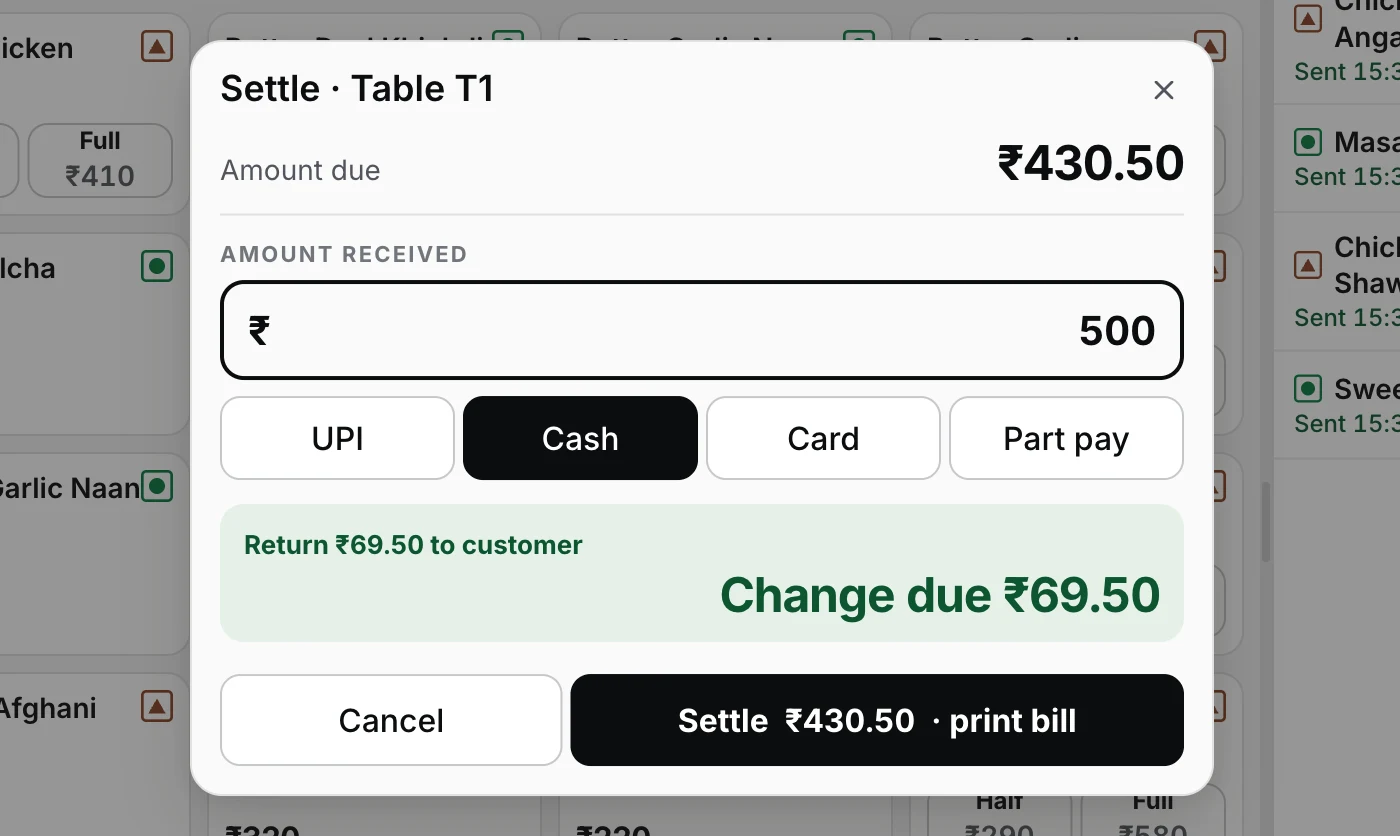
Step 2 — type what was handed over; the change to return is on screen before the drawer opens.
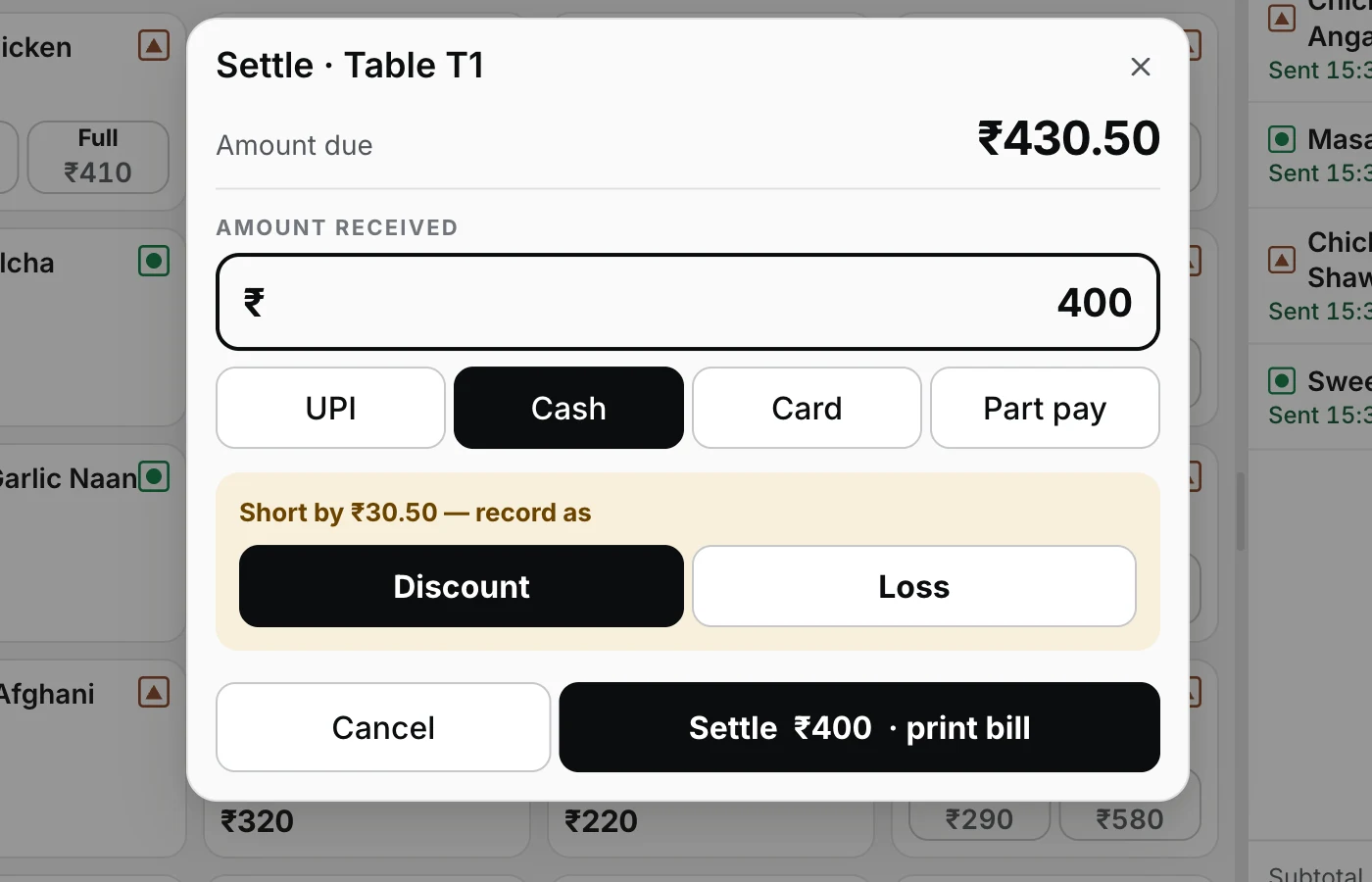
Paid less? The register makes the gap a decision — discount or loss — never a mystery.
Pick the tender and confirm
UPI, Cash or Card — one tap. UPI means you verified the payment on your own phone's app; Card means the guest paid on your card machine. The confirm key spells out what will happen — 'Settle ₹436.50 · print bill' — and on confirm the receipt queues and the cash drawer kicks open. Paid less than due? The register refuses to look away: either record the gap as a Discount or a Loss, or flip on Part pay and take the rest later.
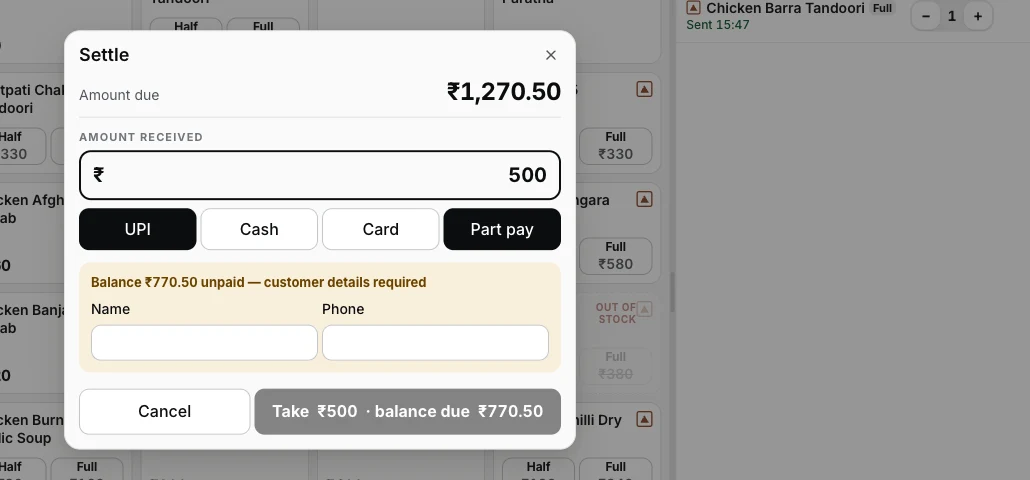
Step 3 — part pay takes what's offered, keeps the check open, and puts a name on the balance.
Four endings, and every one lands on the books right.
- Exact — the prefilled amount, one confirm. Receipt queues, drawer kicks, table frees up.
- Over — the green panel names the change to return. The sale books at the bill amount; the note handed over and the change given ride the payment record. Your day's takings are never inflated by big notes.
- Short — a forced choice, Discount or Loss, typed into the record. The drawer can be short; the story about it cannot be missing.
- Part pay — takes what's offered, keeps the check open with the balance and a customer name and phone against it. No receipt and no drawer until the check truly closes — and the balance can be paid by a different tender.
And if the printer is dead at the settle, the sale still stands — the ledger writes first, the paper queues and retries. The printer troubleshooting guide covers getting it back.
Straight answers.
Guest ne ₹2000 ka note diya, bill ₹1,436.50 ka — ab?
What if the guest pays less than the bill?
Can a table pay half now and half later?
How does UPI work — does the register verify the payment?
Do you support card machines?
What about the odd paise — does it round?
Does settling need the internet?
Around the settle.
Your first GST bill
What prints after the settle — the invoice number, CGST and SGST, and where the rate comes from.
See the billing walkthrough →Discounts, voids & refunds
The money keys that need a reason — and the manager PIN that signs them.
See the money controls →Closing the day
Part-paid checks and strays at midnight — how the register sorts the leftovers.
Close the day →Every guide in this cluster is listed on the guides hub.
3 mahine chalao, phir paisa lagao.
Three months free, full product, no card. Made in India, for the counter — built inside a running restaurant.