Do bill nikal gaye
Ghabraane ki baat nahi — do slip hain, sale ek hi hai. Print beech mein toota tab, jab printer ko bytes mil chuke the, toh register ne apne aap dobara bhejne se mana kar diya aur aapse poochha. Aapne 'Print again' chuna, aur doosri copy par saaf-saaf DUPLICATE chhapa hai, usi purane bill number aur usi taareekh ke saath.
Whatever the printer does, the sale is already saved — the register writes the bill to its own database first and queues the paper second. The full nine-symptom checklist covers the rest.
One print, an ambiguous ending, and a deliberate refusal to guess.
- The link died after the bytes were sent. A Wi-Fi blip or a cable pulled at the wrong instant leaves the register unable to say whether paper came out. The printer may have printed the whole thing, or nothing.
- The register will not retry that job on its own. A blind retry after an ambiguous send is precisely how a customer gets two bills. So the job is parked, marked “Needs you — may have printed”, and waits for a person who can look at the printer.
- You told it to print again. That is the correct action when nothing came out, and it is the action that produces a second slip when something did. The DUPLICATE banner exists for exactly this moment.
Do this first.
Look at the paper before you choose
A job the register cannot vouch for sits in the print queue in Settings → Printers & KDS reading “Needs you — may have printed”. Walk to the printer. What is on the roll decides the answer, and nothing else can.
Answer with It printed, or Print again
The parked row has exactly two keys. It printed closes the job with no more paper. Print again (marked duplicate) sends it once more with a DUPLICATE banner across the top. Those two are deliberately the only options: there is no third choice that guesses on your behalf.
Hand over the clean copy
Both slips are the same invoice, with the same number and the same original issue date — a duplicate handed over in October still shows the date the sale actually happened. Give the customer the one that printed properly.
Reprint any bill later, from Orders
You do not need the queue for this. Open the order and press Reprint receipt: the copy carries *** DUPLICATE — COPY 2 *** above the lines, loud enough that nobody presents it as a fresh bill by accident.
What the printer's row says.
Every printer you have added has a row in Settings → Printers & KDS, and the row carries its own status in words rather than a green dot. These are the exact words for this one.
- While it is wrong: “Needs you — may have printed” on the job in the print queue. If the ambiguous send happened at the moment you settled, the register opens a dialog titled “… may have printed” with four choices — Retry now, Fix printer, Send to <another printer>, and Skip — keep it for reprint.
- Once it is fixed: The job leaves the queue as soon as you answer, and the printer's own row goes back to “Connected”.
The stamp is the point. A second copy that announces itself cannot be entered twice, cannot be handed over as a fresh bill, and cannot quietly become a second sale in the day's numbers — which is why the banner is loud, at the top, before anyone reads the total.
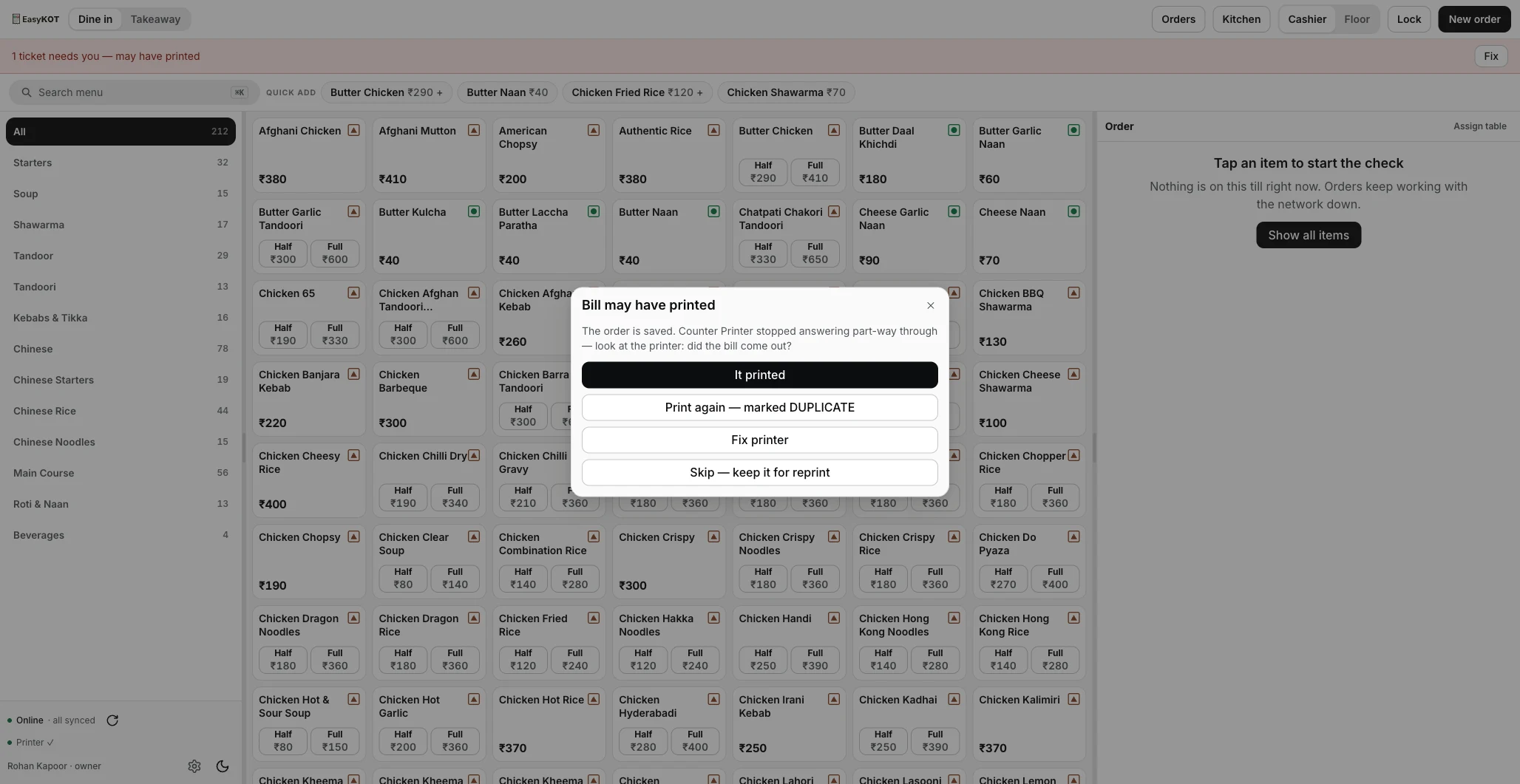
The dialog that appears the moment an ambiguous send happens — the two real answers are It printed and Print again.
Printing what was missed.
- A KOT reprint is not stamped. The kitchen wants the ticket, not a number. Only receipts carry the DUPLICATE banner, because only receipts can be mistaken for a second sale.
- The invoice number never changes on a reprint. A reprinted bill keeps the number and the date it was issued with. Your invoice series stays unbroken, which is what the day-close document register checks for.
- Reprint the last one in a single key. Settings → Printers & KDS has Reprint last receipt and Reprint last KOT for the ticket that just went wrong.
Two bills came out — the questions that follow.
Customer ko kaun si copy dun?
Does a duplicate bill count twice in my sales?
Why does the register not just retry the print by itself?
Can I stop the DUPLICATE stamp?
If that was not it.
Prints once, then stops
The other half of an interrupted service — a queue that stalls and what each row is waiting on.
Fix the stall →Discounts, voids & refunds
The rest of the money controls — and the DUPLICATE stamp in its wider context.
See the money controls →Day close
The GST document register that proves your invoice series has no gaps at the end of the night.
Close the day →Every printer guide is listed on the guides hub.
3 mahine chalao, phir paisa lagao.
Three months free, full product, no card. Made in India, for the counter — built inside a running restaurant.